
 English
 usheenthermal

High Thermal Conductive Graphene Thermal Pad: How to Choose the Best Option for High-Performance Cooling (2026 Guide)
Date:2026-02-27
High Thermal Conductive Graphene Thermal Pad: How to Choose the Best Option for High-Performance Cooling (2026 Guide)
When your brand-new RTX 5090 graphics card starts throttling mid-game, or your AI server cluster keeps triggering overheat limits, you know what to do—it's time to talk about thermal interface materials.If you've been building PCs or managing data centers long enough, you've probably tried all sorts of thermal interface materials: thermal grease that dries out after six months, liquid metal that works wonders but is prone to short circuits, and those old-fashioned silicone thermal pads that crumble like cardboard after aging. But the key point is—graphene thermal pads are a game-changer, and 2026 could very well be the year they become ubiquitous.
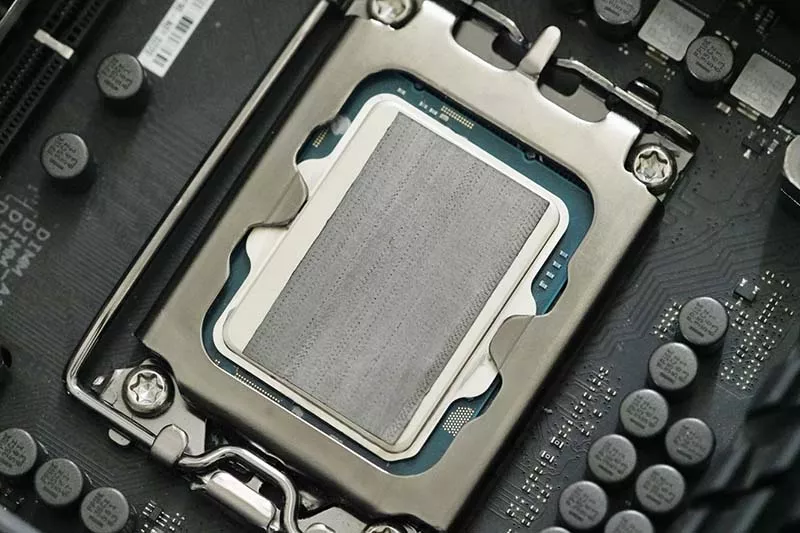
According to recent market forecasts, "global spending on thermal interface materials will exceed $5.8 billion by 2032." This says one thing: this stuff is incredibly important—far more important than most people realize.
What Exactly Is a Graphene Thermal Pad? (And Why Should You Care?)
Let's start with the basics. A graphene thermal pad is essentially a solid, flexible sheet made from layered graphene or graphene composites. It sits between your heat source (CPU, GPU, or whatever's cooking) and your heatsink, filling those microscopic gaps that would otherwise trap air and ruin your day.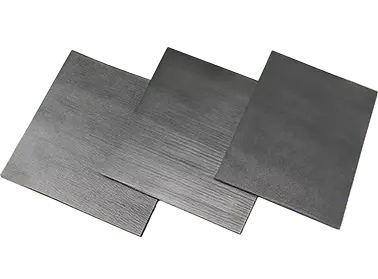
| Properties | Unit | Graphene Thermal Pad | Test Method |
| Color | - | Black | Visual |
| Thermal Conductivity | W/m·K | ≥70 | ASTM D5471 |
| Thermal Impedance (@40psi) | ℃*in2/W | ≤0.1 | ASTM D5470 |
| Thickness | mm | 0.3~10.0 | ASTM D374 |
| Hardness | Shore 00 | 60~80 | ASTM D2240 |
| Flammability rating | - | V-0 | UL 94 |
| RoHS | - | PASS | IEC 62321 |
| Halogen | - | PASS | EN 14582 |
| REACH | - | PASS | EN 14372 |
Here's the cool part—graphene's carbon atoms arrange themselves in a hexagonal lattice that conducts heat like nothing else. We're talking about in-plane thermal conductivity that theoretically hits 4,000-5,000 W/m·K in perfect conditions. Now, real-world composite pads won't hit those numbers (more on that later), but they're still leagues ahead of traditional materials .
The key differentiator? Unlike traditional silicone-based pads that limp along at 3-10 W/m·K, or thermal pastes that pump out and degrade over time, high-end graphene thermal pads deliver metal-like conductivity in a stable, solid form factor. No mess, no curing time, no "did I apply enough?" anxiety.
Why Make the Switch? Graphene vs Everything Else
Thermal Conductivity That Actually Impresses
Let's look at some numbers. High-quality graphene thermal pads now reach 70-130+ W/m·K, with research pushing far beyond that. A 2026 study published in Matter demonstrated graphene-based composites achieving bulk thermal conductivity exceeding 460 W/m·K with total thermal resistance as low as 1.8 mm²K/W at 50 psi . That's not just "good for a pad"—that's competing with liquid metal.Let's take Sheen's thermal conductive products as an example:
- High-performance graphene thermal pads: 70-130+ W/m·K
- Carbon fiber thermal pads: 15-45 W/m·K
- Silicone thermal pads: 1.5-15 W/m·K
- Phase change materials: 3-8 W/m·K
- Standard thermal paste: 1-5 W/m·K
The Reliability Factor
Here's where it gets really interesting. Remember the last time you had to re-apply thermal paste because your temps crept up over time? That's "pump-out"—the material slowly migrating away from the die under thermal cycles. Liquid metal has its own issues: oxidation, corrosion, and the terrifying possibility of a conductive spill taking out your motherboard.Graphene thermal pads solve all of that. They don't dry out. They don't crack. They don't pump out. Manufacturers often claim lifespans up to 10 years, and honestly? Based on accelerated testing, that's not marketing hype .
Installation That Won't Make You Sweat
Ever tried applying liquid metal on a direct-die laptop CPU? It's like performing surgery while holding your breath. One sneeze and you're shopping for a new motherboard.With graphene thermal pads, it's cut, place, and press. That's it. No spreading, no curing, no cleanup. Most quality pads are coated with an insulating layer, so you don't have to worry about short circuits either .
How to Choose: 5 Factors That Actually Matter
1. Thermal Conductivity (W/m·K) — But Don't Get Greedy
Yes, higher numbers are better. But here's the catch: some manufacturers throw around eye-popping figures like 1500 W/m·K, and you should be skeptical. Pure graphene can theoretically hit ~4000 W/m·K, but a real-world composite pad has binders, interfaces, and practical limitations .Look for verifiable data. Sheen Technology's latest graphene thermal pad boasts a thermal conductivity of up to 70 W/m·K and excellent compressibility. Crucially, it has already been successfully mass-produced—this is the optimal balance.
2. Thickness and Compression — The Goldilocks Zone
Thickness matters because it determines what gap you can fill. For direct-die laptop applications, you want thin—0.3mm or less. For IHS-covered desktop CPUs, 0.5mm is typical.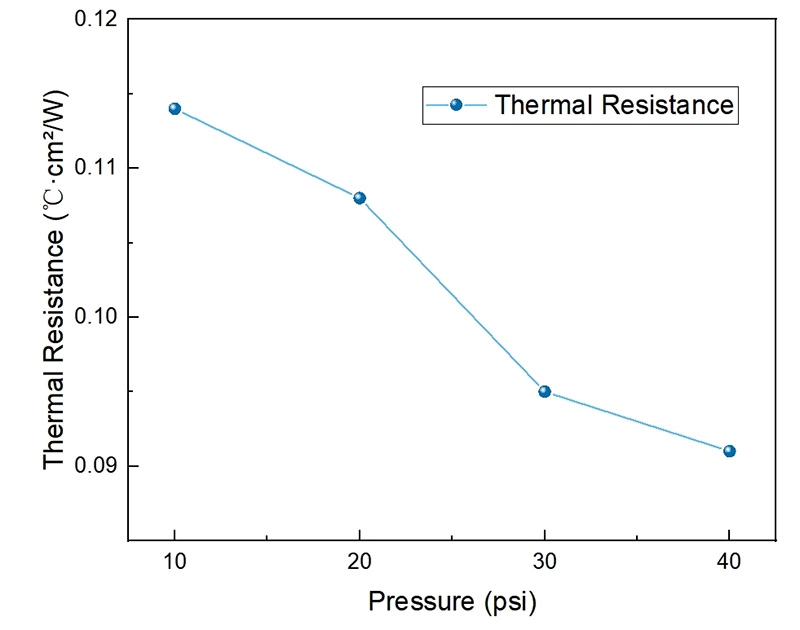
But here's what most people miss: compressibility and rebound rate. A good pad should maintain at least 90% rebound after 30% compression. That ensures it stays in contact through thermal cycling, preventing performance loss over time . Research at Sheen Technology Labs shows that it can withstand 45% strain at 50 psi – this remarkable flexibility helps maintain the integrity of the contact.
3. Thermal Resistance (°C·cm²/W) — The Real Story
Thermal conductivity gets all the attention, but thermal resistance is the metric that actually tells you how well the material performs in real life. It factors in both conductivity and thickness to show the material's true opposition to heat flow.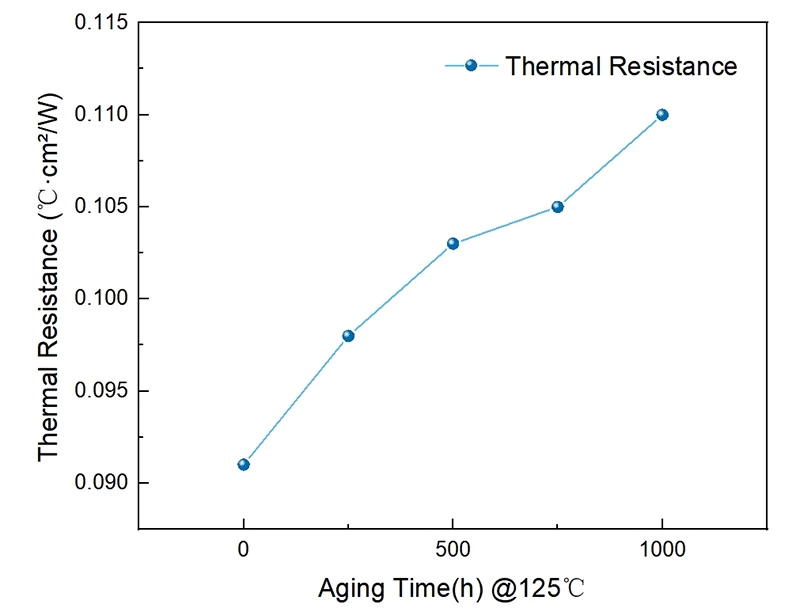
Lower is better. The latest research has pushed solid-state graphene thermal pads down to 1.8 mm²K/W at 50 psi—effectively matching liquid metal's thermal performance without any of the risks .
4. Fit and Dimensions — Measure Twice, Cut Once
This sounds obvious, but you'd be surprised how many people get it wrong:- For AMD AM5 CPUs: 32x32mm square
- For Intel LGA1700/1851: 21x44mm rectangle
- For GPUs: You'll likely need to cut custom shapes
Quality graphene thermal pads cut cleanly without tearing. Cheap ones? They crumble and leave you with a mess .
5. Material Composition and Safety
Not all graphene pads are created equal. Look for pads made from graphene-silicon composites with a dielectric coating. This ensures you get the thermal performance without electrical conductivity risks. Pure graphene is conductive—encapsulation is what makes it safe for everyday use .Which Graphene Pad Fits Your Scenario?
The Hardcore Gamer / Enthusiast
If you're pushing an overclocked 14900KS or waiting for the next-gen Ryzen, you need maximum performance without maintenance headaches. A high-conductivity pad in the 70-130 W/m·K range is your sweet spot. Sheen Technologies' latest GSF graphene thermal pad delivers heat dissipation performance comparable to liquid metal in gaming laptops—perfect for a "one-and-done" setup.The Data Center / AI Server Operator
This is where reliability becomes mission-critical. When you're running 24/7 AI training workloads, downtime isn't an option. Look for pads with proven stability under thermal cycling—the kind that reduce chip temps by 15-30°C and cut fan energy use while running for years without degradation . The research specifically notes that their material "can replace liquid metal for the heat dissipation of CPUs/GPUs in high-performance gaming laptops" while offering lower cost and excellent thermal stability .The Laptop / Compact PC User
Space-constrained devices suffer from pump-out more than anything. An ultra-thin pad (0.3mm or less) that maintains contact through constant heating/cooling cycles is your best bet. As Sheen Technologies engineers have stated, this thermal pad is particularly important due to its 45% compressibility—allowing it to adapt to the bending and movement of compact chassis.Installation Tips: Don't Sabotage Your Own Cooling
I've seen too many people blame the pad when the real problem was user error. Here's how to get it right:· Pressure is non-negotiable. You need at least 20 psi, ideally 40-60 psi. Without sufficient mounting pressure, those graphene layers won't make proper contact, and your temps will suffer .
· Clean those surfaces. Unlike paste, pads can't flow into every microscopic imperfection. Use alcohol wipes on both the CPU/GPU lid and the cooler base. Even a fingerprint can create an air gap .
· Handle with care. Graphene pads are tough in-plane but delicate through-thickness. Use tweezers on the edges, avoid bending, and place it once—peeling it up and repositioning can cause delamination .
· Check your gap. Make sure your application gap matches the pad's recommended compression range. Too little compression and contact suffers; too much and you risk damaging components .
Frequently Asked Questions
Q1: Is such a high-performance graphene thermal pad conductive?A: Graphene material itself is conductive, but in practical applications, it is usually coated with an insulating layer to prevent short circuits.
Therefore, it is safe to use; please always check the manufacturer's specifications.
Q2: Can I reuse a graphene thermal pad?
A: While some users report reusability, manufacturers generally advise against it for optimal performance. The pad may compress or deform slightly upon removal .
Q3: How do I install a graphene thermal pad?
A: Clean both surfaces with alcohol, cut the pad to size if needed, peel any protective liners, place it directly on the chip, and mount your cooler with adequate pressure (20-60 psi). No spreading or curing required .
Q4: Is a graphene pad better than liquid metal?
A: Each material has its advantages; it depends on the specific situation.
• In some cases, liquid metal may have slightly higher thermal conductivity.
• Graphene thermal pads are safer, easier to install, and do not degrade or corrode.
Sheen Technology's recently developed graphene thermal pads perform comparable to liquid metal thermal pads without any potential risks.
Q5: How long do graphene thermal pads last?
A: Manufacturers often claim lifespans of up to 10 years, as they don't dry out or crack like traditional thermal paste. Accelerated testing confirms excellent thermal cycling stability .
The best choice depends on your specific application. High-performance parameters also mean soaring costs, as performance improvements themselves require investment. Graphene outperforms traditional thermal conductive materials in performance, and its cost is also significantly higher. However, overall, graphene represents not only incremental improvement but also a true leap forward.
Ready to optimize your cooling solution? Browse our selection of industry-leading Graphene Thermal Pads or Contact our engineering team for personalized advice on your specific application to find your perfect thermal solution.
Sheen Thermal
Dongguan Sheen Electronic Technology Co., Ltd · Founded in 2008
Manufacturer of thermal interface materials and silicone foam for automotive electronics, energy storage, power electronics, communications and consumer electronics.
Certified
- ISO 9001:2015
- ISO 14001:2015
- IATF 16949:2016
What we supply
- Thermal conductivity Up to 90 W/m·K
- Thickness 0.3–10.0 mm
- Custom & samples Die-cut to drawing, 3–7 days