
 English
 usheenthermal

How Data Center Thermal Management Solutions Improve Energy Efficiency
Date:2026-04-15
How Data Center Thermal Management Solutions Improve Energy Efficiency
Data center thermal management isn’t just about keeping servers cool—it’s about stopping your power bill from running wild. Data centers already consume roughly 1–1.5% of global electricity, according to the International Energy Agency. That’s real money humming through cooling systems every second. When airflow stumbles or equipment overheats, profits sweat right along with it.
Think of your facility like a high performance engine: too hot, it burns out; too cold, it wastes fuel. Smart cooling, liquid systems, precision sensors—these aren’t upgrades for show. They’re the difference between coasting efficiently and watching margins melt.
Data Proves: 20% Lower PUE With Thermal Control
Modern facilities live or die by data center thermal management. Break it down—data, center, thermal, management—and it’s clear: every watt and every airflow path matters for real savings.
Interpreting PUE Improvements in Data Centers
Understanding PUE inside a Data Center starts with structure:
Core Formula and Metrics
1.1 Power Usage Effectiveness = Total Facility Energy ÷ IT Load
1.2 Lower ratios signal stronger Energy Efficiency and tighter Performance control
1.3 Trends over time reveal cooling drift or airflow imbalance
Operational Drivers
2.1 Cooling plant load
2.2 Air distribution losses
2.3 Electrical conversion waste
| Month | IT Load (kW) | Total Energy (kW) | PUE | Cooling Share (%) |
| Jan | 800 | 1200 | 1.50 | 38 |
| Feb | 820 | 1180 | 1.44 | 35 |
| Mar | 790 | 1100 | 1.39 | 33 |
| Apr | 810 | 1080 | 1.33 | 30 |
| May | 830 | 1060 | 1.28 | 28 |
Consistent data center thermal management stabilizes these numbers and keeps the Metrics honest.
How Thermal Control Drives 20% Energy Savings
Effective Thermal Control in data center thermal management cuts waste fast.
· Containment limits hot-air recirculation.
· Variable fans match real-time load.
· Smart setpoints trim excess cooling.
Add tighter Cooling Systems tuning and you get measurable Energy Savings. In plain terms, less overcooling equals lower compressor runtime and real Efficiency Gains.
Many operators now treat data center thermal management as daily hygiene. That shift alone reduces Reduced Consumption and boosts optimization results.
Case Study: Cooling Optimization Success
A retrofit focused on Cooling Optimization delivered clear Results:
Implementation Path
1.1 Aisle containment added
1.2 Sensor grid installed
1.3 Control logic tuned
Performance Improvement Outcomes
2.1 Chiller energy ↓ 18%
2.2 Rack inlet variance <2°C
2.3 Overall PUE improved 20%
This Case Study proves that disciplined data center thermal management lifts Operational Efficiency quickly.
Data Center Thermal Management 101
Data center thermal management sounds technical, but at its core it’s about keeping cool heads in a very hot room. Break the phrase down—data, center, thermal, management—and it becomes simple: manage heat where computing lives.
Key Cooling Techniques Explained
In modern data center thermal management, cooling methods stack together rather than compete.
Core Cooling Approaches
1.1 Air-Based Systems
· air cooling supported by direct expansion cooling units
· Traditional CRAC setups tied to air circulation paths
1.2 Water-Based Systems
· liquid cooling loops near high-density chips
· Chilled water networks improving heat rejection
1.3 Ambient-Assisted Methods
· free cooling using outside air
· evaporative cooling for low-energy support
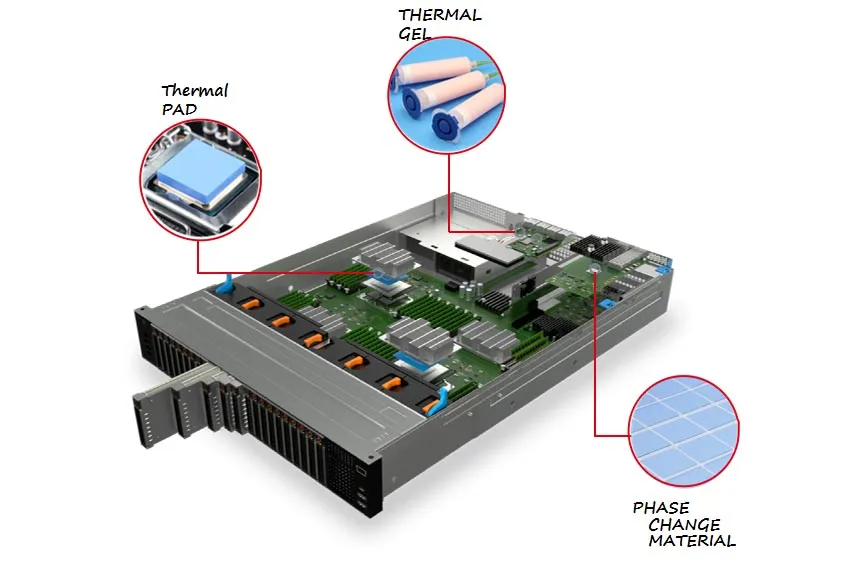
1.4 Thermal Interface Optimization
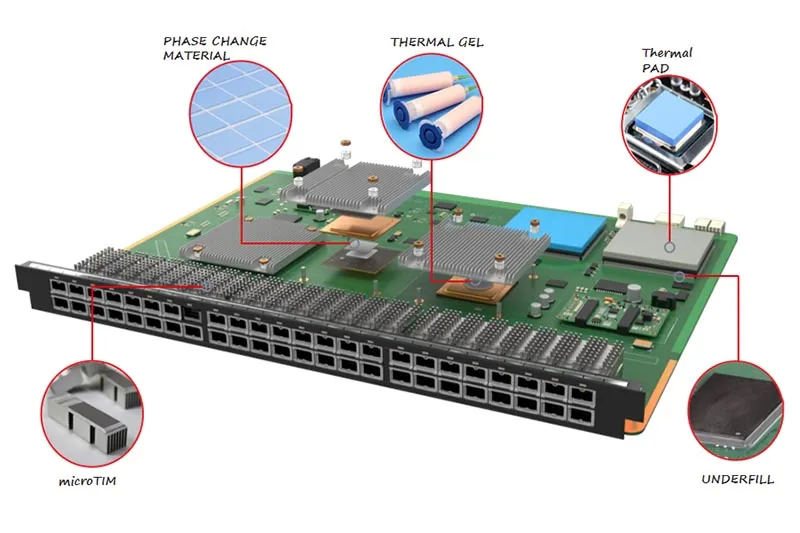
The "invisible handshake" between the heat-generating component (CPU/GPU) and the cooling hardware. Using Thermal Interface Materials (TIMs)—like:
· High-performance thermal pads
· Thermal gels
· Phase change thermal materials
Operational Fit
2.1 High-density AI racks → Prioritize liquid cooling combined with high-conductivity TIMs (like carbon fiber pads) to handle extreme heat flux.
2.2 Moderate enterprise loads → Optimize air cooling with reliable silicone-based thermal pads.
2.3 Hybrid builds → blend cooling modes
This layered approach strengthens data center thermal management and keeps data center heat control aligned with real workloads.
Understanding Hot and Cold Aisle Containment
Effective data center thermal management depends on airflow discipline.
Layout Fundamentals
1.1 cold aisle containment channels supply air to server racks
1.2 hot aisle containment traps exhaust heat
1.3 Controlled airflow management boosts air circulation
Performance Impact
· Higher return temperatures improve chiller efficiency
· Reduced mixing lowers cooling demand
· Stable intake air protects hardware
Smart aisle design strengthens thermal management in data center environments and supports energy-aware data center cooling strategies promoted by Sheen Technology.
The Role of TIMs in Containment Efficiency
Aisle containment is only as good as the heat it can "catch." By using efficient Thermal Interface Materials, servers can transfer heat to the exhaust stream more effectively. This results in higher return air temperatures, which actually allows chillers to operate more efficiently.
Stable intake air protects hardware, and high-performance TIMs ensure the internal silicon temperature stays well below the "throttle" zone, even when room temperatures are slightly elevated for energy savings.
The Role of Sensors in Temperature Regulation
Reliable data center thermal management runs on feedback.
Sensor Network Layers
1.1 Rack Level
· temperature sensors at inlets
· humidity sensors near exhaust
1.2 Room Level
· pressure sensors under raised floors
· Linked data acquisition systems
Control Loop
2.1 Sensors send data
2.2 Platforms enable real-time monitoring
2.3 Cooling output adjusts automatically
This cycle keeps data center heat management steady and responsive, forming the backbone of modern data center thermal management.
Balancing Air Temperature and Humidity
Stable data center thermal management is not just about cool air.
Environmental Targets
· Maintain optimal temperature ranges
· Track relative humidity and dew point
· Protect air quality
Risk Control
2.1 Low humidity → static discharge
2.2 High humidity → condensation
2.3 Poor balance → unstable environmental control
Fine-tuning these factors allows higher supply temperatures without stress on hardware. That’s practical data center cooling—steady, efficient, and built for real-world loads, exactly the mindset behind Sheen Technology’s approach to data center thermal management.
4 Steps To Implement Liquid Cooling
Liquid cooling is reshaping data center thermal management, making heat control smarter and tighter. For any data center chasing stable thermal management and better energy use, this roadmap keeps things practical and grounded.
Step 1: Selecting the Right Liquid Medium
Choosing a coolant shapes the future of your data center thermal management plan.
Coolant Properties
· heat transfer coefficient
· viscosity
· corrosion resistance
· fluid compatibility
Water
· High thermal capacity
· Needs corrosion control
Dielectric fluid
· Electrically safe
· Higher cost
Refrigerants
· Strong phase-change cooling
· Tighter compliance rules
| Medium | Heat Transfer Coefficient (W/m·K) | Viscosity (cP @25°C) | Corrosion Risk | Typical Use |
| Water | 0.60 | 0.89 | Medium | Direct-to-chip |
| Dielectric Fluid | 0.12 | 1.80 | Low | Immersion |
| Refrigerant | 0.08 | 0.25 | Low | Two-phase |
| Glycol Mix | 0.40 | 2.50 | Medium | Cold plates |
Step 2: Designing the Cooling Loop
A clean loop keeps data center thermal management steady under pressure.
Server rack configuration
· High rack density
· IT load zones
Core Components
· heat exchanger
· pump selection
· manifold design
Engineering Checks
· flow rate optimization
· pressure drop calculation
· Balanced piping layout
Underneath it all:
✅ Power budget
✅ Backup pumps
✅ Leak containment
This layered setup protects data center thermal stability while improving cooling efficiency across high-density racks.
Step 3: Integrating with Existing Infrastructure
Retrofit projects can feel messy, but structure keeps things smooth.
Facility Alignment
· power distribution capacity
· Floor space allocation
· Structural load checks
IT Coordination
· IT equipment compatibility
· Smart airflow management during transition
Control Layer
· Tie into building management system
· Real-time alarms
Step 4: Monitoring and Maintenance Best Practices
Long-term data center thermal management lives or dies on visibility.
Sensors & Hardware
· temperature sensors
· pressure gauges
· leak detection systems
Fluid Health
· Routine fluid analysis
· Track contamination levels
Operational Discipline
· preventive maintenance schedule
· Defined performance metrics
· Continuous system diagnostics
Break it down:
· Daily: temperature and pressure logs
· Monthly: coolant quality check
· Quarterly: full loop inspection
That rhythm keeps your data center cooling predictable. When metrics trend right, uptime follows.
Airflow Management Vs. Brute-Force Cooling
Modern data center thermal management is not just about blasting cold air. It’s about control, direction, and smart energy use. Let’s break down how airflow design beats brute cooling in real-world data center cooling.
Airflow Management
Effective data center thermal management starts at rack level and scales outward.
Rack-Level Control
1.1 Install blanking panels to stop recirculation.
1.2 Use air baffles to guide supply air.
1.3 Seal gaps with raised floor grommets.
Aisle Containment
2.1 Deploy hot aisle containment to isolate exhaust heat.
2.2 Use cold aisle containment to protect intake temperatures.
2.3 Improve airflow optimization through pressure balancing.
Layout & Monitoring
3.1 Align racks for predictable airflow paths.
3.2 Track inlet temperatures for thermal management data.
3.3 Reduce fan energy by minimizing bypass air.
| Configuration Type | Avg Inlet Temp (°C) | Fan Speed (%) | PUE Impact |
| No Containment | 27 | 85 | 1.75 |
| Cold Aisle Setup | 24 | 70 | 1.62 |
| Full Containment | 22 | 58 | 1.48 |
In 2024, the Uptime Institute noted that facilities using containment strategies consistently report lower cooling energy intensity and improved airflow stability.
Brute-Force Cooling
This method feels simple but costs more long term.
· Lower the whole room temperature.
· Push high fan speeds.
· Add redundant cooling capacity.
Sounds easy, right? Not quite.
Overcooling drives excessive airflow, which increases compressor runtime. Energy bills climb. PUE creeps up due to energy waste. Facilities often end up with higher PUE despite heavy cooling infrastructure.
Here’s the pattern:
· Hot spots appear.
· Operators drop thermostat settings.
· Equipment runs harder.
· Operating costs spike.
Cooling the entire data hall instead of fixing airflow paths ignores the basics of thermal management in data centers. It treats symptoms, not root causes.
Too Much Condenser Work? Smart Controls Help
Modern data center thermal management is no small task. As racks get denser, heat piles up fast. Smart controls now shape how every data center, cooling loop, and airflow path behaves. Good data center thermal management keeps power bills sane and servers steady.
Variable Speed Drives for Compressor Efficiency
In tight data center thermal management, Variable Speed Drives reshape how compressors respond to load swings.
Core Function
Motor Speed Control
· Matches RPM to live IT demand
· Cuts wasted torque during partial load
Load Matching
· Aligns compressor output with server heat
· Prevents sudden condenser spikes
Performance Impact
Reduced Power Consumption
· Lower kW during off peak hours
· Smoother amp draw across feeders
Energy Savings
· Better annualized PUE
· Less strain on backup systems
Operational Stability
· Supports steady data center cooling
· Extends Compressor Efficiency lifespan
For growing data center thermal management plans, this keeps the condenser from working overtime and helps the whole cooling system breathe easier.
Real-Time Chiller Optimization Algorithms
Smart Chiller Optimization relies on Real-Time Control and sharp Algorithm Performance tuned to cooling load shifts in data center thermal management.
· Sensors read return water temperature, humidity, and IT load.
· The system recalculates setpoints for peak Operational Efficiency.
· Chillers sequence automatically for balanced System Performance.
| Load (%) | COP | Power (kW) | Return Temp (°C) |
| 40 | 6.1 | 420 | 18 |
| 60 | 5.8 | 630 | 20 |
| 80 | 5.2 | 910 | 22 |
| 100 | 4.7 | 1200 | 24 |
Benefits
· Lower peak demand
· Smarter energy management
· Stable data center cooling
The IEA’s 2024 update notes that cooling already accounts for nearly 40% of data center electricity use globally, and efficiency gains remain a top priority for operators.
Predictive Maintenance Reduces Overloading
Strong data center thermal management depends on early warnings, not late-night alarms.
Monitoring Layer
Performance Monitoring
· Tracks pressure, airflow, vibration
· Flags signs of Equipment Overloading
Analytics Layer
· Detects fouling and refrigerant imbalance
· Supports Failure Prevention models
· Schedules fixes before Operational Downtime
Reliability Outcomes
· Higher System Reliability
· Smarter Maintenance Scheduling
· Balanced condenser pressure
When data center thermal management tools catch small issues early, the entire data center cooling network runs smoother. Sheen Technology aligns predictive models with real facility data, keeping thermal management steady and avoiding nasty overload surprises.
Is Overcooling Hurting Your Budget?
Overcooling quietly drains power and cash in many facilities. Smart data center thermal management keeps systems steady without wasting energy. Let’s break down how better data center cooling and thermal control can cut costs fast.
Identifying Overcooling Hotspots
In data center thermal management, spotting waste starts with visibility.
Monitoring Layer
· temperature sensors track rack inlet and return air conditions.
· airflow monitoring tools reveal bypass air and over-supplied zones.
· thermal imaging scans confirm uneven cooling patterns.
Analytics Layer
· data center infrastructure management (DCIM) platforms centralize readings.
· computational fluid dynamics (CFD) models simulate airflow before physical changes.
· hot spot detection alerts flag risky but often overcooled racks.
When data center cooling teams combine these tools, overchilled aisles become obvious. Solid data center thermal management avoids blasting cold air “just in case” and supports smarter thermal management across the data center.
Implementing Temperature Setpoint Adjustments
Adjusting setpoints is not guesswork; it’s structured control within data center thermal management.
Assessment
· Review server inlet temperature trends.
· Compare with ASHRAE guidelines and the optimal temperature range.
Risk Control
· Conduct risk assessment before changes.
· Validate alarms in control systems.
Optimization
· Raise supply air slowly.
· Track energy savings potential after each shift.
This approach strengthens data center cooling efficiency and keeps data center thermal management aligned with uptime goals.
Leveraging Economizer Cycles for Savings
Economizers are a big win in modern data center thermal management.
Airside Strategy
· Check outside air temperature suitability.
· Maintain tight humidity control.
· Deploy airside economizers during cool seasons.
Waterside Strategy
· Use cooling towers with waterside economizers.
· Reduce chiller runtime for clear energy consumption reduction.
With Sheen Technology, facilities tap true free cooling without risking stability. Smart moves like these turn data center thermal management into measurable savings.
FAQs about Data Center Thermal Management
How does data center thermal management improve energy efficiency?
Smart cooling feels like a quiet caretaker rather than a loud machine.
· Shorter compressor runtime as temperatures settle into a calm rhythm
· Cleaner airflow paths, so cold air reaches people’s servers instead of empty space
· Humidity and heat kept within ASHRAE comfort bands, easing hardware stress
· Variable-speed drives that slow down when the room breathes easier
The result shows up on the power bill and in fewer late-night alarms.
What are the key components of an effective thermal control system?
A strong setup reads like a well-run team, each role clear.
| Component | Human-centered role |
| CRAC/CRAH or chilled water | Keeps the room calm under pressure |
| Sensors | Act as eyes and ears at rack level |
| Hot/cold aisle containment | Prevents wasted effort and confusion |
| Control software | Adjusts setpoints like a steady hand on the wheel |
When these work together, operators stop firefighting and start planning.
What role do sensors play in data center thermal management?
Sensors add tension and relief at the same time.
1) Rack temperatures update in real time, no guesswork.
2) Fans respond instantly, rising or resting as needed.
3) Hotspots surface early, before people feel the heat.
4) Patterns hint at future faults, cutting surprise outages.
Even system noise—like repeated warnings of “Undefined array key ‘candidates’” or “Trying to access array offset on value of type null”—can mirror how missing data creates blind spots without proper sensing.
What measurable results come from proper thermal management?
A well-executed retrofit changes the mood of an operations floor.
▸ Around 20% less chiller energy after containment and smarter controls
▸ Rack temperatures that stop swinging, easing human anxiety
▸ ROI often reached inside twelve months
When deprecated habits fade—much like a “str_replace(): Passing null” warning finally resolved—the data center runs quieter, steadier, and with more trust from the people who depend on it.
Sheen Thermal
Dongguan Sheen Electronic Technology Co., Ltd · Founded in 2008
Manufacturer of thermal interface materials and silicone foam for automotive electronics, energy storage, power electronics, communications and consumer electronics.
Certified
- ISO 9001:2015
- ISO 14001:2015
- IATF 16949:2016
What we supply
- Thermal conductivity Up to 90 W/m·K
- Thickness 0.3–10.0 mm
- Custom & samples Die-cut to drawing, 3–7 days